

Python's built-in list stores references to Python objects: each element costs ~8 bytes for the pointer held in the list's internal array, plus the referenced object itself — a small int is ~28 bytes on 64-bit CPython. That per-object overhead is what a raw C array avoids. The standard library array module provides a C-backed, fixed-type array that stores raw values in contiguous memory — the same layout a C or Cython program would use.
Book alignment
This page is an implementation extension alongside the Necaise array/vector chapters.
It keeps the same array ADT reasoning while showing a lower-level memory layout available in Python's standard library.
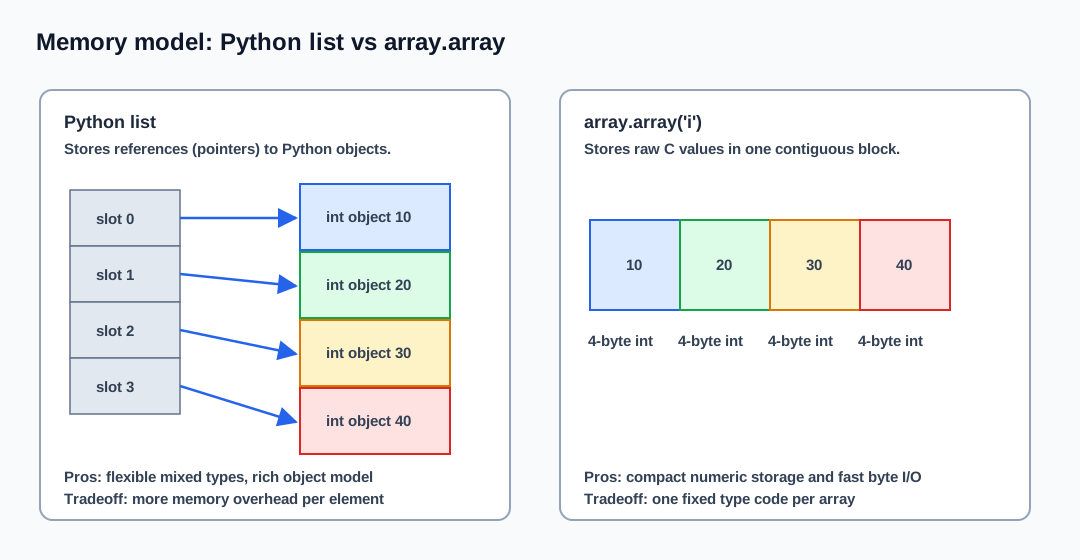
This makes array ideal when you need:
- A large collection of numbers stored compactly — with a narrow type code (
'i','h','B', …) it reaches the smallest possible memory footprint. - Interoperability with C extensions,
struct, ormmap. - Fast bulk I/O (the entire array can be serialised to bytes in one call).
Type codes
Each array is created with a type code that fixes the element type for the lifetime of the array.
| Type code | C type | Python type | Minimum size |
|---|---|---|---|
'b' |
signed char |
int |
1 byte |
'B' |
unsigned char |
int |
1 byte |
'h' |
signed short |
int |
2 bytes |
'H' |
unsigned short |
int |
2 bytes |
'i' |
signed int |
int |
2 bytes |
'I' |
unsigned int |
int |
2 bytes |
'l' |
signed long |
int |
4 bytes |
'L' |
unsigned long |
int |
4 bytes |
'q' |
signed long long |
int |
8 bytes |
'Q' |
unsigned long long |
int |
8 bytes |
'f' |
float |
float |
4 bytes |
'd' |
double |
float |
8 bytes |
Creating an array
import array

# Empty array of signed integers
ints = array.array('i')

# Initialised from an iterable
floats = array.array('f', [1.0, 2.5, 3.14])

# From a range
counts = array.array('l', range(1_000_000))
Operations
append and extend
append and extend work identically to list. Elements must match the type code.
a = array.array('i', [10, 20, 30])
a.append(40)          # [10, 20, 30, 40]
a.extend([50, 60])    # [10, 20, 30, 40, 50, 60]
Index access and slicing
Random access by index is O(1), same as list. Slicing returns a new array of the same type.
a = array.array('d', [1.1, 2.2, 3.3, 4.4])
print(a[1])       # 2.2
print(a[-1])      # 4.4
print(a[1:3])     # array('d', [2.2, 3.3])
Insert and delete
a = array.array('i', [1, 2, 3, 4])
a.insert(2, 99)   # [1, 2, 99, 3, 4]  — O(n) shift
a.pop(2)          # removes 99        — O(n) shift
a.remove(3)       # removes first 3   — O(n) scan + shift
Searching
a = array.array('i', [10, 20, 30, 20])
print(a.index(20))   # 1  — first occurrence, O(n)
print(a.count(20))   # 2  — count occurrences, O(n)
Reversing
a = array.array('i', [1, 2, 3])
a.reverse()
print(a)   # array('i', [3, 2, 1])
Bulk byte I/O
The key advantage over list: an entire array can be serialised to or from raw bytes in constant time per byte — not per element — because the memory is already contiguous and typed.
import array

a = array.array('i', [1, 2, 3, 4])

# Serialise to bytes
raw = a.tobytes()
print(len(raw))   # 16  (4 ints × 4 bytes each)

# Deserialise
b = array.array('i')
b.frombytes(raw)
print(b)          # array('i', [1, 2, 3, 4])
File I/O
import array

a = array.array('d', [3.14, 2.71, 1.41])

with open('numbers.bin', 'wb') as f:
    a.tofile(f)

loaded = array.array('d')
with open('numbers.bin', 'rb') as f:
    loaded.fromfile(f, 3)   # read exactly 3 elements

print(loaded)   # array('d', [3.14, 2.71, 1.41])
Memory comparison: list vs array
import sys
import array

n = 1_000_000

py_list = list(range(n))
c_array = array.array('l', range(n))

print(f"list  : {sys.getsizeof(py_list):,} bytes")
print(f"array : {sys.getsizeof(c_array):,} bytes")
# Typical output on 64-bit CPython 3.13:
# list  : 8,000,056 bytes
# array : 8,183,816 bytes  (l = 8-byte signed long — same 8 bytes/elem
#                           as the list's pointers, so no saving here;
#                           the array can even be larger due to over-allocation)
#
# A narrower type code is what actually saves memory. For 32-bit
# integers ('i', 4 bytes each):
# array : 4,091,948 bytes  — roughly half the memory of the list
#
# Exact byte counts depend on the platform, CPython build, and the
# array's over-allocation, so treat these as representative.
An 'l' array gives no memory saving over a list on a 64-bit build — both spend 8 bytes per element (a pointer for the list, a long for the array), and the array may even be slightly larger because of over-allocation. The saving appears only when the type code is narrower than a pointer (8 bytes on 64-bit): signed int ('i', 4 bytes) cuts memory roughly in half; unsigned char ('B', 1 byte) cuts it to about one-eighth.
Wrapper class
You can wrap array.array in a class that enforces the type code and adds domain-specific methods:
import array


class IntArray:
    """A resizable array of signed 64-bit integers."""

    TYPECODE = 'q'  # signed long long

    def __init__(self, iterable=()):
        self._data = array.array(self.TYPECODE, iterable)

    def append(self, value):
        self._data.append(value)

    def get(self, index):
        if index < 0 or index >= len(self._data):
            raise IndexError("index out of range")
        return self._data[index]

    def set(self, index, value):
        if index < 0 or index >= len(self._data):
            raise IndexError("index out of range")
        self._data[index] = value

    def insert(self, index, value):
        self._data.insert(index, value)

    def delete(self, index):
        if index < 0 or index >= len(self._data):
            raise IndexError("index out of range")
        return self._data.pop(index)

    def tobytes(self):
        return self._data.tobytes()

    @classmethod
    def frombytes(cls, raw):
        obj = cls()
        obj._data.frombytes(raw)
        return obj

    def __len__(self):
        return len(self._data)

    def __iter__(self):
        return iter(self._data)

    def __repr__(self):
        return f"IntArray({list(self._data)})"
Connection to Cython and NumPy
Python's array module uses the same buffer protocol that Cython and NumPy rely on. This means:
- A Cython function that accepts
int[:](a typed memoryview) can receive anarray.array('i', ...)with zero-copy. - NumPy can wrap an
array.arraywithout copying the underlying memory. - C extensions written with the CPython C API can call
PyBUF_SIMPLEto get a direct pointer into the array's storage.
# non-runnable: requires numpy
import array
import numpy as np

a = array.array('d', [1.0, 2.0, 3.0, 4.0])

# Zero-copy view — NumPy reads the same memory block
arr = np.frombuffer(a, dtype=np.float64)
print(arr)          # [1. 2. 3. 4.]
print(arr.base)     # <memory at 0x...>  — not a copy
When to prefer NumPy
Use array.array when:
- You want a stdlib-only solution with no extra dependencies.
- The data is one-dimensional and does not need vectorised math.
- You need fast binary serialisation for network packets or file formats.
Use NumPy when:
- You need multi-dimensional arrays.
- You need vectorised arithmetic, broadcasting, or linear algebra.
- You work with scientific or machine-learning code.
When not to use array.array
- You need mixed element types or nested structures.
- You need fast arbitrary inserts/deletes in the middle.
- You need labeled dimensions, masks, broadcasting, or matrix operations.
Complexity summary
| Operation | Time | Notes |
|---|---|---|
| Read / write by index | O(1) |
Direct pointer offset, no boxing |
| Append | O(1) amortized |
Same growth strategy as list |
| Insert in middle | O(n) |
Elements shift in raw memory |
| Delete in middle | O(n) |
Elements shift in raw memory |
tobytes |
O(n) |
Memcopy of contiguous block |
frombytes |
O(n) |
Memcopy into contiguous block |
index / count |
O(n) |
Linear scan |
Typical mistakes
- Trying to store mixed types —
arrayenforces a single type code and raisesTypeErroron mismatch. - Forgetting byte order when exchanging files between big-endian and little-endian systems. Use
a.byteswap()orstruct.packwith an explicit endian prefix. - Reaching for
arraywhen NumPy is already available — for numeric work, NumPy is more capable and usually faster. - Assuming
array.arrayis faster thanlistfor pure Python loops — the speed advantage appears in bulk I/O and C extension calls, not in Python-levelforloops.