


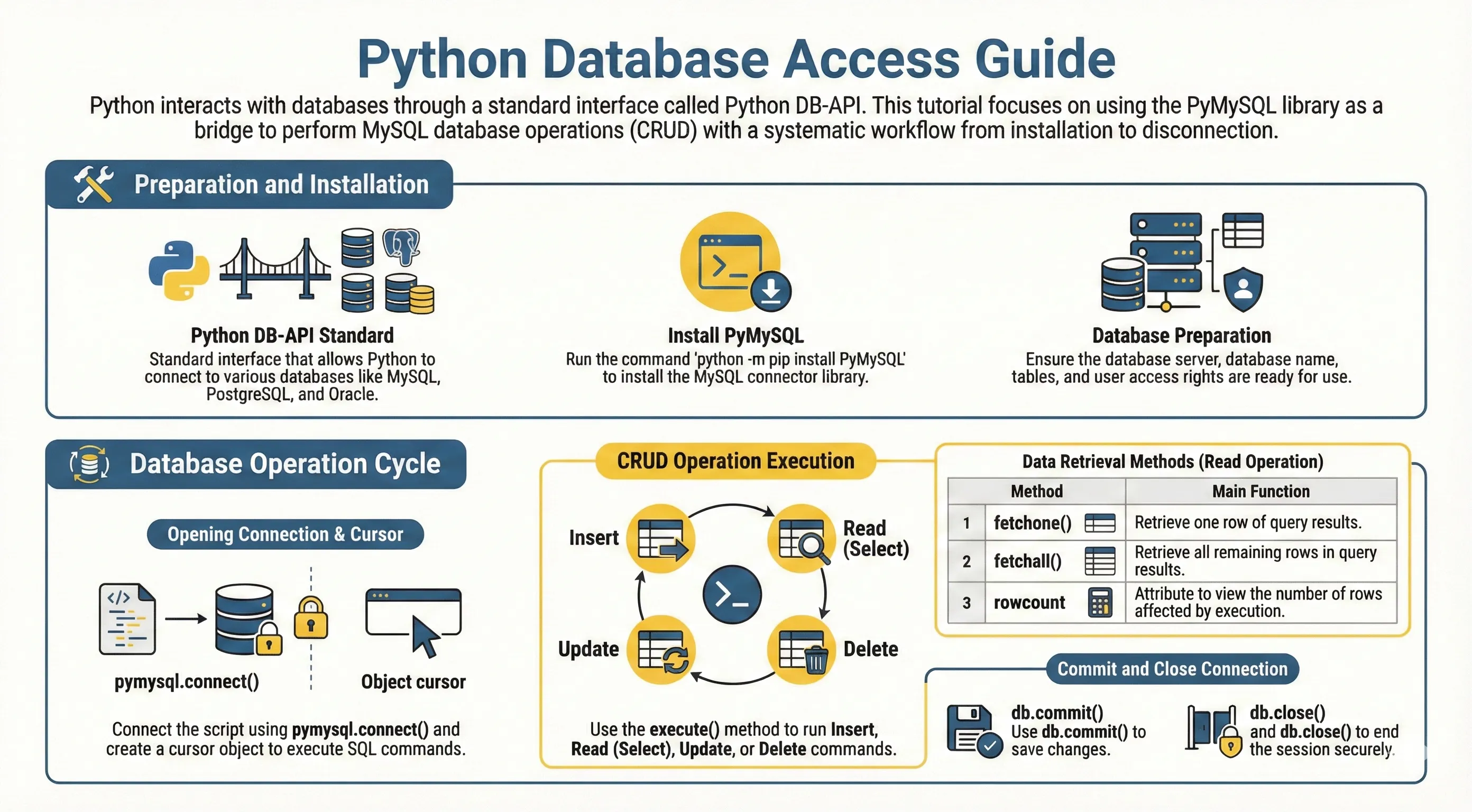
Python uchun ma'lumotlar bazasi adapterlari odatda DB-API 2.0 spetsifikatsiyasiga amal qiladi. Bu turli ma'lumotlar bazalarida bir xil dasturlash modelini beradi: ulanish (connect), cursor yaratish, SQL bajarish, row'larni olish (fetch) va commit/rollback.
Python bilan ko'p ishlatiladigan ma'lumotlar bazalari:
- SQLite (o'rnatilgan/built-in)
- PostgreSQL
- MySQL/MariaDB
- Microsoft SQL Server
- Oracle
PyMySQL nima?
PyMySQL — DB-API 2.0 ni amalga oshiradigan sof Python (pure-Python) MySQL mijozi.
SQLite bilan ishlasangiz, Python standart kutubxonasida sqlite3 allaqachon bor.
PyMySQL o'rnatish
python -m pip install pymysql
Ulanish sozlamasi (keyingi misollarda ishlatiladi)
Ma'lumotlar bazasiga kirish ma'lumotlarini (credentials) bir marta sozlab, har bir bo'limda get_connection() ni qayta ishlating.
pymysql o'rnatilgan bo'lishi va quyidagi kirish ma'lumotlari (credentials) bilan sozlangan ishlayotgan MySQL ma'lumotlar bazasi bo'lishi kerak.# non-runnable: requires external environment/setup
import pymysql
DB_CONFIG = {
"host": "localhost",
"user": "testuser",
"password": "test123",
"database": "TESTDB",
"charset": "utf8mb4",
}
def get_connection():
return pymysql.connect(**DB_CONFIG)
Oddiy ulanish misoli
# non-runnable: requires external environment/setup
with get_connection() as connection:
    with connection.cursor() as cursor:
        cursor.execute("SELECT VERSION()")
        version = cursor.fetchone()
        print("Database version:", version)
Jadval yaratish
Insert/read/update/delete qilishdan oldin schema yarating:
# non-runnable: requires external environment/setup
create_sql = """
CREATE TABLE IF NOT EXISTS employee (
    id INT PRIMARY KEY AUTO_INCREMENT,
    first_name VARCHAR(50) NOT NULL,
    last_name VARCHAR(50),
    age INT,
    sex CHAR(1),
    income DECIMAL(10, 2)
)
"""

with get_connection() as connection:
    with connection.cursor() as cursor:
        cursor.execute(create_sql)
    connection.commit()
Ma'lumot qo'shish (parameterized query)
SQL injection oldini olish uchun placeholder ishlating.
# non-runnable: requires external environment/setup
insert_sql = """
INSERT INTO employee (first_name, last_name, age, sex, income)
VALUES (%s, %s, %s, %s, %s)
"""

with get_connection() as connection:
    with connection.cursor() as cursor:
        cursor.execute(insert_sql, ("Mac", "Mohan", 20, "M", 2000.00))
    connection.commit()
Ma'lumot o'qish
Ko'p row uchun fetchall(), bitta row uchun fetchone() ishlating:
# non-runnable: requires external environment/setup
select_sql = "SELECT first_name, last_name, age, sex, income FROM employee WHERE income > %s"

with get_connection() as connection:
    with connection.cursor() as cursor:
        cursor.execute(select_sql, (1000,))
        rows = cursor.fetchall()

for row in rows:
    print(row)
Ma'lumot yangilash
# non-runnable: requires external environment/setup
update_sql = "UPDATE employee SET age = age + 1 WHERE sex = %s"

with get_connection() as connection:
    with connection.cursor() as cursor:
        cursor.execute(update_sql, ("M",))
    connection.commit()
Ma'lumot o'chirish
# non-runnable: requires external environment/setup
delete_sql = "DELETE FROM employee WHERE age > %s"

with get_connection() as connection:
    with connection.cursor() as cursor:
        cursor.execute(delete_sql, (20,))
    connection.commit()
Transaction bo'yicha eslatmalar
connection.commit()o'zgarishlarni saqlaydi.connection.rollback()saqlanmagan o'zgarishlarni bekor qiladi.- Connection/cursor'larni doim yoping (yoki yuqoridagidek kontekst menejerdan foydalaning).
Bir nechta yozish (write) amali ketma-ket bo'lsa, xatoda rollback qiling:
# non-runnable: requires external environment/setup
with get_connection() as connection:
    try:
        with connection.cursor() as cursor:
            cursor.execute("UPDATE employee SET income = income + %s", (100,))
            cursor.execute("UPDATE employee SET income = income - %s WHERE id = %s", (100, 1))
        connection.commit()
    except Exception:
        connection.rollback()
        raise
Ko'p uchraydigan xatolar
Access denied: username/password yoki host noto'g'ri.Unknown databaseyokiTable doesn't exist: setup SQL hali bajarilmagan.INSERT/UPDATE/DELETEdan keyincommit()ni unutish, shuning uchun o'zgarishlar "saqlanmagandek" ko'rinadi.- SQL'ni string formatlash bilan qurish, placeholder (
%s) ishlatmaslik (SQL injection xavfi).
Til va kutubxonalar bo'yicha to'liq ma'lumot uchun Python hujjatlari ni ko'ring.