


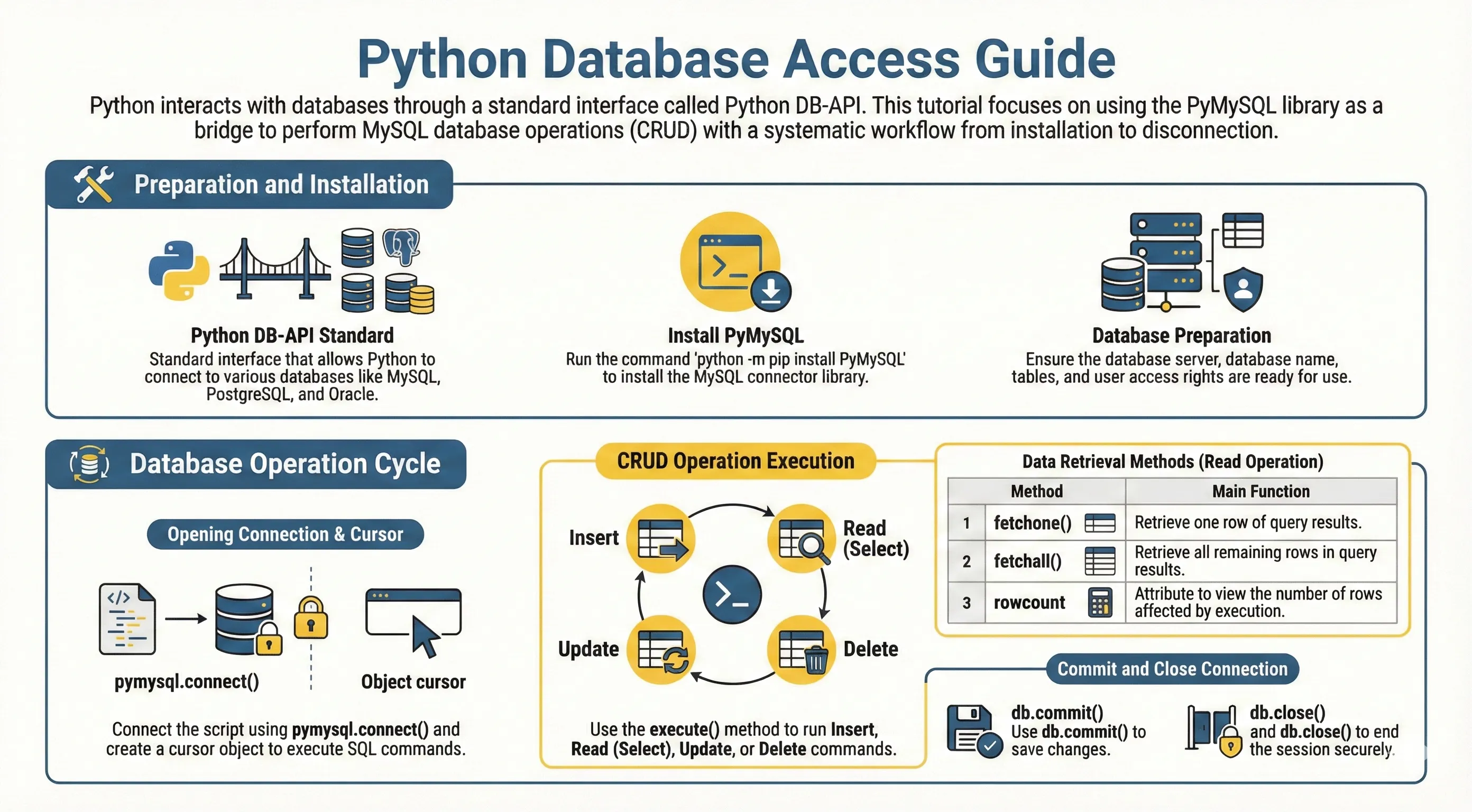
Python database adapters generally follow the DB-API 2.0 specification. This gives a consistent programming model across databases: connect, create cursor, execute SQL, fetch rows, and commit/rollback.
Common databases used with Python include:
- SQLite (built in)
- PostgreSQL
- MySQL/MariaDB
- Microsoft SQL Server
- Oracle
What is PyMySQL?
PyMySQL is a pure-Python MySQL client implementing DB-API 2.0.
If you work with SQLite, Python already includes sqlite3 in the standard library.
Install PyMySQL
python -m pip install pymysql
Connection Setup (Used in Next Examples)
Set your database credentials once, then reuse get_connection() in each section.
To run this snippet, you must have
pymysql installed and a running MySQL database configured with the credentials below.# non-runnable: requires external environment/setup
import pymysql
DB_CONFIG = {
"host": "localhost",
"user": "testuser",
"password": "test123",
"database": "TESTDB",
"charset": "utf8mb4",
}
def get_connection():
return pymysql.connect(**DB_CONFIG)
Basic Connection Example
# non-runnable: requires external environment/setup
with get_connection() as connection:
    with connection.cursor() as cursor:
        cursor.execute("SELECT VERSION()")
        version = cursor.fetchone()
        print("Database version:", version)
Create Table
Create schema before doing insert/read/update/delete:
# non-runnable: requires external environment/setup
create_sql = """
CREATE TABLE IF NOT EXISTS employee (
    id INT PRIMARY KEY AUTO_INCREMENT,
    first_name VARCHAR(50) NOT NULL,
    last_name VARCHAR(50),
    age INT,
    sex CHAR(1),
    income DECIMAL(10, 2)
)
"""

with get_connection() as connection:
    with connection.cursor() as cursor:
        cursor.execute(create_sql)
    connection.commit()
Insert Data (Parameterized Query)
Use placeholders to avoid SQL injection.
# non-runnable: requires external environment/setup
insert_sql = """
INSERT INTO employee (first_name, last_name, age, sex, income)
VALUES (%s, %s, %s, %s, %s)
"""

with get_connection() as connection:
    with connection.cursor() as cursor:
        cursor.execute(insert_sql, ("Mac", "Mohan", 20, "M", 2000.00))
    connection.commit()
Read Data
Use fetchall() for many rows or fetchone() for a single row:
# non-runnable: requires external environment/setup
select_sql = "SELECT first_name, last_name, age, sex, income FROM employee WHERE income > %s"

with get_connection() as connection:
    with connection.cursor() as cursor:
        cursor.execute(select_sql, (1000,))
        rows = cursor.fetchall()

for row in rows:
    print(row)
Update Data
# non-runnable: requires external environment/setup
update_sql = "UPDATE employee SET age = age + 1 WHERE sex = %s"

with get_connection() as connection:
    with connection.cursor() as cursor:
        cursor.execute(update_sql, ("M",))
    connection.commit()
Delete Data
# non-runnable: requires external environment/setup
delete_sql = "DELETE FROM employee WHERE age > %s"

with get_connection() as connection:
    with connection.cursor() as cursor:
        cursor.execute(delete_sql, (20,))
    connection.commit()
Transaction Notes
connection.commit()saves changes.connection.rollback()cancels uncommitted changes.- Always close connections/cursors (or use context managers as shown).
For multi-step writes, rollback on failure:
# non-runnable: requires external environment/setup
with get_connection() as connection:
    try:
        with connection.cursor() as cursor:
            cursor.execute("UPDATE employee SET income = income + %s", (100,))
            cursor.execute("UPDATE employee SET income = income - %s WHERE id = %s", (100, 1))
        connection.commit()
    except Exception:
        connection.rollback()
        raise
Common Errors
Access deniedfrom wrong username/password or host.Unknown databaseorTable doesn't existwhen setup SQL has not been run yet.- Forgetting
commit()afterINSERT/UPDATE/DELETE, so changes appear to "not save". - Building SQL with string formatting instead of placeholders (
%s), which risks SQL injection.
For complete language and library references, see Python documentation.