


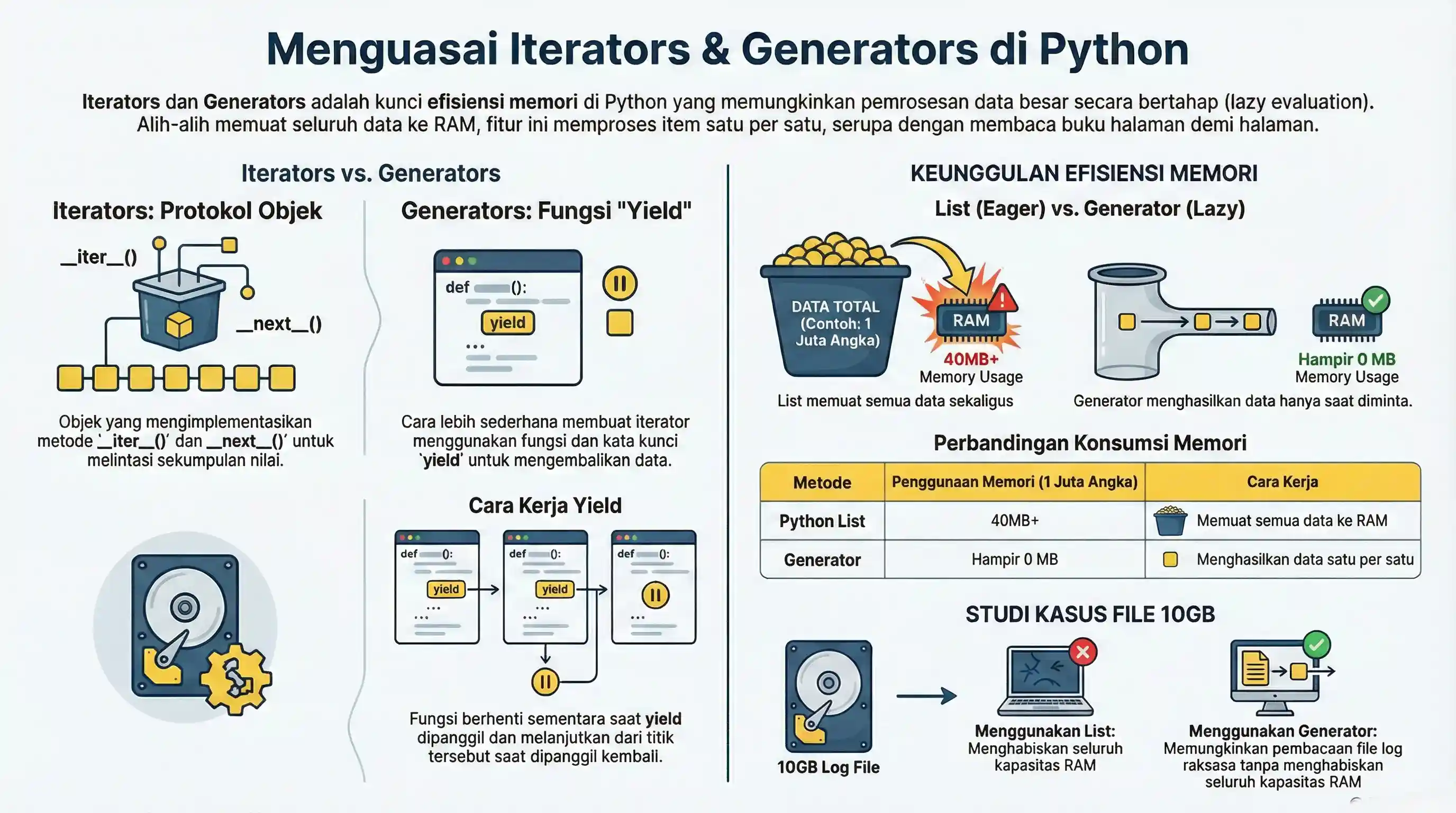
In the Python world, Iterators and Generators are keys to memory efficiency. They allow you to process large amounts of data (even infinite) without having to load everything into RAM at once.
Imagine you want to read a thick book. An iterator allows you to read page by page (loading only one page into memory), instead of trying to memorize a 1000-page book at once.
1. Iterators
An iterator is an object that contains a countable number of values. An iterator can be iterated upon, meaning you can traverse through all the values.
Technically, in Python, an iterator is an object which implements the iterator protocol, which consists of the methods __iter__() and __next__().
Example Creating an Iterator
Let's create a simple iterator that returns numbers starting from 1 up to a certain limit.
class MyNumbers:
    def __init__(self, limit):
        self.limit = limit
        self.num = 1

    def __iter__(self):
        return self

    def __next__(self):
        if self.num <= self.limit:
            x = self.num
            self.num += 1
            return x
        else:
            raise StopIteration

myclass = MyNumbers(3)
myiter = iter(myclass)

print(next(myiter)) # Output: 1
print(next(myiter)) # Output: 2
print(next(myiter)) # Output: 3
# print(next(myiter)) # Will raise StopIteration error
When you use a for loop, Python automatically handles __iter__() and the StopIteration exception.
for x in MyNumbers(3):
    print(x)
2. Generators
Generators are a simple way of creating iterators. Instead of writing a long class with __iter__() and __next__(), you simply define a regular function and use the yield keyword where you want to return data.
Each time yield is called, the function "pauses", saving all its variables, and resumes from that point when called again.
Simple Generator Example
def number_generator(limit):
    num = 1
    while num <= limit:
        yield num
        num += 1

gen = number_generator(3)
# Generator is also an iterator!
print(next(gen)) # 1
print(next(gen)) # 2
print(next(gen)) # 3
Generator Advantage: Memory Efficiency
Imagine you need to process 1 million numbers.
Using List (Consumes Memory):
def get_list():
    result = []
    for i in range(1000000):
        result.append(i)
    return result

# This will consume memory around 40MB+ for list of integers
Using Generator (Saves Memory):
def get_generator():
    for i in range(1000000):
        yield i

# This consumes almost no extra memory, because numbers are generated one by one when requested.
3. Generator Expression
Similar to List Comprehension, but using regular parentheses (). It returns a generator object, not a list.
# List comprehension (creates full list in memory)
squares_list = [x**2 for x in range(10)]
print(squares_list) # [0, 1, 4, ..., 81]

# Generator expression (lazy evaluation)
squares_gen = (x**2 for x in range(10))
print(squares_gen) # <generator object ...>

# To see content, must iterate
for i in squares_gen:
    print(i, end=" ")
4. Case Study: Reading Large Files
If you have to process a 10GB server log file.
Wrong (Don't do this):
server.log file exists. It will result in an error if executed without the file.def read_file_wrong(filename):
file = open(filename)
content = file.read() # Danger! Will load entire 10GB to RAM.
return content.split("\n")
Right (Use Generator):
server.log is not present in your directory.def read_file_right(filename):
with open(filename, "r", encoding="utf-8") as handle:
for line in handle:
yield line
with open("server.log", "w", encoding="utf-8") as handle:
handle.write("INFO Started\n")
handle.write("ERROR Disk nearly full\n")
handle.write("INFO Completed\n")
# We can loop through 10GB file without memory issues
for line in read_file_right("server.log"):
if "ERROR" in line:
print(line)
5. Infinite Generators
Because values are produced on demand, a generator can describe an endless sequence. The caller decides when to stop:
def count_up(start=0):
    num = start
    while True:           # never ends on its own
        yield num
        num += 1

gen = count_up(10)
print(next(gen))   # 10
print(next(gen))   # 11
print(next(gen))   # 12
A for loop over an infinite generator must break out itself, otherwise it runs forever:
def count_up(start=0):
    num = start
    while True:
        yield num
        num += 1

for n in count_up():
    if n > 3:
        break
    print(n)   # 0 1 2 3
6. Delegating with yield from
When one generator needs to yield all the values of another iterable, yield from does it in a single line instead of a manual loop:
def letters():
    yield from "AB"

def numbers():
    yield from range(1, 3)

def combined():
    yield from letters()
    yield from numbers()

print(list(combined()))   # ['A', 'B', 1, 2]
This keeps generator pipelines flat and readable, and is especially useful for flattening nested data.
Conclusion
- Iterator: An object that can be iterated (
__next__). - Generator: A function that produces (
yield) values one by one (lazy evaluation). yield from: Delegates to another iterable without a manual loop.- Use Generators when working with large datasets or infinite data streams.