


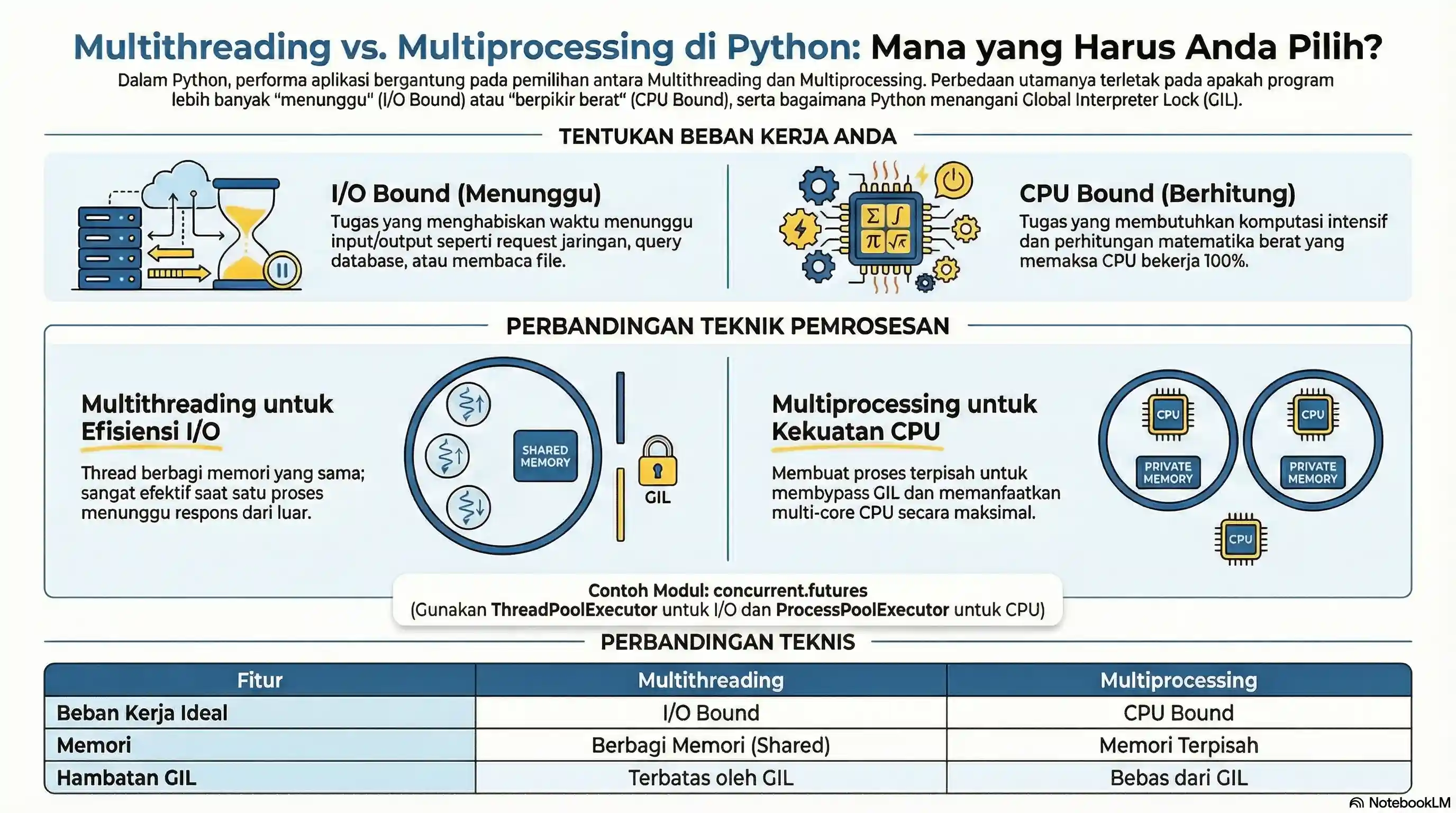
In modern computing, we often hear terms like parallelism and concurrency. In Python, there are two main ways to do multiple things "at once": Multithreading and Multiprocessing.
The choice between them depends heavily on the type of task you are working on: whether it is I/O Bound or CPU Bound.
1. I/O Bound vs CPU Bound
- I/O Bound: Program spends most of its time waiting for input/output (example: network requests, reading disk files, database queries). CPU is often idle.
- CPU Bound: Program spends its time doing mathematical calculations or heavy data processing. CPU works at 100%.
2. Multithreading (For I/O Bound)
Threading uses threads inside the same single process. Threads share the same memory.
However, Python (CPython) has a GIL (Global Interpreter Lock), which prevents two Python threads from executing bytecode simultaneously on a single CPU core. So, Multithreading in Python does not make CPU-bound code faster (it can even be slower due to overhead).
But, Multithreading is very fast for I/O Bound because when one thread waits (e.g., waiting for web response), other threads can run.
import threading
import time

def download_page(url):
    print(f"Start downloading {url}...")
    time.sleep(2) # Simulate network delay
    print(f"Finished downloading {url}")

start = time.time()

threads = []
urls = ["web1", "web2", "web3"]

for url in urls:
    t = threading.Thread(target=download_page, args=(url,))
    threads.append(t)
    t.start()

# Wait for all threads to complete
for t in threads:
    t.join()

end = time.time()
print(f"Total time: {end - start:.2f} seconds")
# Output around 2 seconds, not 6 seconds!
3. Multiprocessing (For CPU Bound)
Multiprocessing creates separate new Python processes. Each process has its own Python interpreter and memory space. This bypasses GIL, so it can utilize multi-core CPU maximally.
Use this for computationally heavy tasks.
import multiprocessing
import time

def heavy_square_calculation(number):
    print(f"Process {number} starts...")
    result = sum(i * i for i in range(10**7)) # Heavy calculation
    print(f"Process {number} finished.")
    return result

if __name__ == "__main__":
    start = time.time()

    # Create 2 processes running parallel on different CPU cores
    p1 = multiprocessing.Process(target=heavy_square_calculation, args=(1,))
    p2 = multiprocessing.Process(target=heavy_square_calculation, args=(2,))

    p1.start()
    p2.start()

    p1.join()
    p2.join()

    end = time.time()
    print(f"Total time: {end - start:.2f} seconds")
Note: You must protect the main code with if __name__ == "__main__": when using multiprocessing in Windows.
4. Concurrent Futures (Modern Way)
Python provides concurrent.futures module which gives higher-level and easier interface for Threading and Multiprocessing.
from concurrent.futures import ThreadPoolExecutor
import time

def task(n):
    time.sleep(1)
    return f"Task {n} finished"

start = time.time()

with ThreadPoolExecutor(max_workers=3) as executor:
    results = executor.map(task, [1, 2, 3])

    for result in results:
        print(result)

print(f"Time: {time.time() - start:.2f} seconds")
Replace ThreadPoolExecutor with ProcessPoolExecutor if you want to switch to multiprocessing.
5. Thread Safety and Locks
Because threads share memory, two threads updating the same variable at once can corrupt it — a race condition. A Lock ensures only one thread enters the critical section at a time.
import threading

counter = 0
lock = threading.Lock()

def increment():
    global counter
    for _ in range(100_000):
        with lock:          # only one thread updates at a time
            counter += 1

threads = [threading.Thread(target=increment) for _ in range(2)]
for t in threads:
    t.start()
for t in threads:
    t.join()

print(counter)   # 200000  (correct thanks to the lock)
Without the lock the final value would often be less than 200000, because both threads can read the same old value before writing.
Note: For single-threaded concurrency on I/O-bound work,
asynciois often a better fit than threads. See the Async / Await tutorial.
Conclusion
| Feature | Multithreading | Multiprocessing |
|---|---|---|
| Memory | Share memory (Shared) | Separate memory (Isolated) |
| Overhead | Low | High (needs start time) |
| Suitable for | I/O Bound (Network, File) | CPU Bound (Math, Data Processing) |
| GIL | Affected by GIL | Free from GIL |