


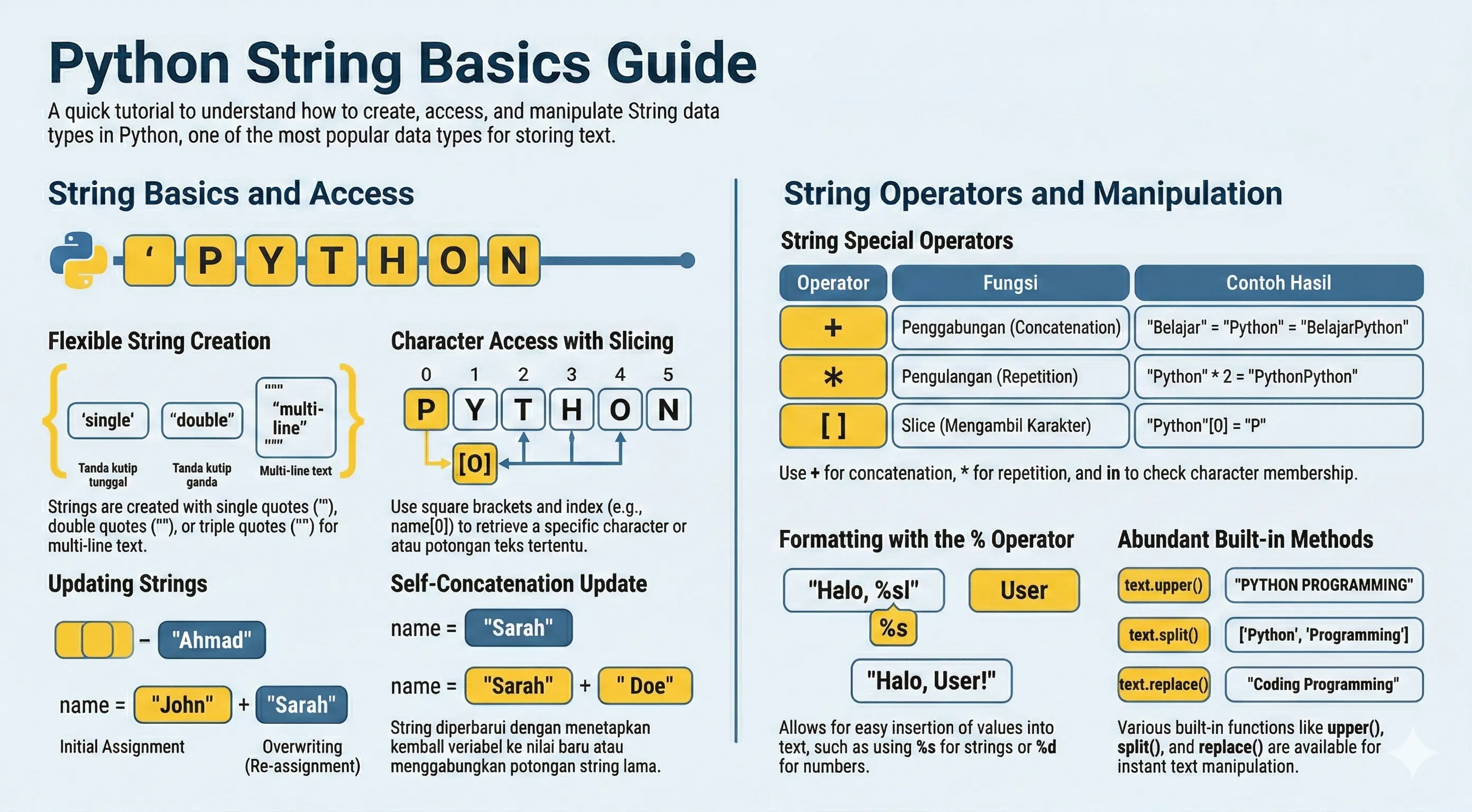
A string is a sequence of Unicode characters. In Python, you can create strings with single quotes, double quotes, or triple quotes.
print("Hello World")
Adjacent String Literals
Python automatically concatenates string literals written next to each other:
text = "Py" "thon"
print(text)  # Python
This is useful for splitting long strings across lines:
message = (
    "This is a long message "
    "split across multiple lines."
)
print(message)
This only works for literals. For variables, use + or f-strings.
Accessing Values in Strings
Use indexing and slicing:
name = "John Doe"
message = "John Doe learns Python"

print("name[0]:", name[0])
print("message[1:4]:", message[1:4])
Strings also support negative indexes (counting from the end) and len():
word = "Python"

print(word[-1])   # n
print(word[-3:])  # hon
print(len(word))  # 6
Updating Strings
Strings are immutable. To "modify" a string, create a new one:
message = "Hello World"
print(message[:6] + "Python")  # Hello Python
Common Escape Characters
| Escape | Meaning |
|---|---|
\n |
New line |
\t |
Horizontal tab |
\r |
Carriage return |
\" |
Double quote |
\' |
Single quote |
\\ |
Backslash |
\b |
Backspace |
\f |
Form feed |
\v |
Vertical tab |
\a |
Bell / alert |
\0 |
Null character |
\xhh |
Character by hex value (e.g. \x41 is A) |
\uXXXX |
Unicode character (16-bit, e.g. \u00E9 is e) |
\UXXXXXXXX |
Unicode character (32-bit) |
\ooo |
Character by octal value (e.g. \101 is A) |
print() vs String Representation
print() displays the text, while repr() shows the string representation (including escape sequences):
text = "First line.\nSecond line."

print(text)
print(repr(text))
String Operators
If a = "Hello" and b = "Python":
| Operator | Example | Result |
|---|---|---|
+ |
a + b |
HelloPython |
* |
a * 2 |
HelloHello |
[] |
a[1] |
e |
[:] |
a[1:4] |
ell |
in |
"H" in a |
True |
not in |
"Z" not in a |
True |
Raw strings are useful for regex and Windows paths:
path = r"C:\new_folder\test"
print(path)
Note: A raw string literal cannot end with a single backslash (for example
r"C:\new_folder\"is invalid). If you need a trailing backslash, use a normal string like"C:\\new_folder\\".
String Formatting
Python supports multiple formatting styles:
name = "Zara"
weight = 21

# f-string (recommended)
print(f"My name is {name} and weight is {weight} kg")

# str.format
print("My name is {} and weight is {} kg".format(name, weight))

# %-formatting (legacy, still valid)
print("My name is %s and weight is %d kg" % (name, weight))
% Formatting Quick Reference
| Specifier | Meaning | Example |
|---|---|---|
%s |
String | "%s" % "Python" |
%d |
Signed integer | "%d" % 42 |
%i |
Signed integer (same as %d) |
"%i" % 42 |
%f |
Float | "%f" % 3.14 |
%.2f |
Float with precision | "%.2f" % 3.14159 |
%e |
Exponential (lowercase) | "%e" % 0.001 |
%E |
Exponential (uppercase) | "%E" % 0.001 |
%g |
Shorter of %f and %e |
"%g" % 0.001 |
%c |
Single character | "%c" % 65 |
%x |
Hex (lowercase) | "%x" % 255 |
%X |
Hex (uppercase) | "%X" % 255 |
%o |
Octal | "%o" % 8 |
Triple Quotes
Triple quotes are useful for multiline text:
text = """This is a long string
that spans multiple lines.
It can contain \t and \n characters too."""
print(text)
Unicode Strings in Python 3
Python 3 strings are Unicode (UTF-8) by default. In Python 2, a u prefix was needed for Unicode strings, but this is no longer necessary.
greeting = "Hello"
city = "London"
emoji = "\U0001F600"
print(greeting, city, emoji)
You can use Unicode escapes or type characters directly:
print("\u00E9")         # e (Unicode escape)
print("cafe\u0301")     # cafe with accent
Built-in String Methods
| Method | Explanation |
|---|---|
capitalize() |
Capitalize first character, lowercase the rest |
center(width, fillchar) |
Center-align within width, padded with fillchar |
count(sub, start, end) |
Count non-overlapping occurrences of sub |
endswith(suffix, start, end) |
Return True if string ends with suffix |
find(sub, start, end) |
Return lowest index of sub, or -1 if not found |
index(sub, start, end) |
Like find(), but raises ValueError if not found |
isalnum() |
True if all characters are alphanumeric |
isalpha() |
True if all characters are alphabetic |
isdigit() |
True if all characters are digits |
isdecimal() |
True if all characters are decimal characters |
islower() |
True if all cased characters are lowercase |
isnumeric() |
True if all characters are numeric |
isspace() |
True if all characters are whitespace |
istitle() |
True if string is title-cased |
isupper() |
True if all cased characters are uppercase |
join(iterable) |
Concatenate iterable with the string as separator |
ljust(width, fillchar) |
Left-align within width |
lower() |
Convert all characters to lowercase |
lstrip(chars) |
Remove leading characters (whitespace by default) |
replace(old, new, count) |
Replace occurrences of old with new |
rfind(sub, start, end) |
Like find(), but search from the right |
rindex(sub, start, end) |
Like index(), but search from the right |
rjust(width, fillchar) |
Right-align within width |
rstrip(chars) |
Remove trailing characters (whitespace by default) |
split(sep, maxsplit) |
Split into list by separator |
splitlines() |
Split by line boundaries |
startswith(prefix, start, end) |
Return True if string starts with prefix |
strip(chars) |
Remove leading and trailing characters |
swapcase() |
Swap lowercase to uppercase and vice versa |
title() |
Title-case: capitalize first letter of each word |
upper() |
Convert all characters to uppercase |
zfill(width) |
Left-pad with zeros to fill width |
text = "  learn python  "
print(text.strip().title())  # Learn Python